 Expanager
 vs Money Manager: which expense tracker should you use?
Money Manager by Realbyte is one of the most installed expense trackers on Android, and a good one. This is Expanager's own comparison, so read it as that. To keep it fair, everything said about Money Manager below comes from its Google Play listing on 22 October 2026, and where the listing doesn't say, we say so instead of guessing. Both apps are rated 4.6 on Google Play.
The short answer
- Choose Money Manager if you like double-entry bookkeeping, want to type entries yourself, and don't mind ads in the free version (or paying once to remove them).
- Choose Expanager if you want entries to come from your bank SMS automatically, you don't want ads at all, and you want your data to stay on your phone with no account.
Side by side
| Money Manager (Realbyte) | Expanager | |
|---|---|---|
| Ads | Yes in the free version; the paid version removes them | None, free or Premium |
| Entries from bank SMS | Not mentioned in its listing | Yes, free: UPI, card and bank alerts become entries |
| Sign-up | See its listing | None |
| Budgets | Budget vs expense graphs | Monthly budgets per category with a daily allowance and an early "you'll overshoot by…" warning; multi-category budgets (Premium) |
| Accounting model | Double-entry bookkeeping | Simple: expenses, income and transfers between wallets |
| Credit cards | Settlement date, payment amount and outstanding | Limit used, due date, spends from SMS |
| Free-version limits | 15 assets (unlimited in the paid version) | Everyday features free; extras such as Drive backup, multi-category budgets and reconciliation are Premium |
| Use from a computer | Edit PC over Wi-Fi | PC Manager over Wi-Fi |
| Backup | Excel backup files | Backup file (free); daily backup to your own Google Drive, including receipt photos (Premium) |
| Import | See its listing | CSV and Excel import, free |
| Statement reconciliation | Not mentioned in its listing | Yes, from PDF, Excel or CSV (Premium) |
| Where your data lives | See its listing and privacy policy | On your phone; no servers for your data |
| Works offline | See its listing | Fully |
| Passcode lock | Yes | Yes, password or fingerprint |
| Languages | See its listing | 20 |
Where Money Manager is stronger
Its double-entry model is a real advantage if you think in accounts: income is deposited into an asset the moment you record it, expenses are drawn from one, and the asset tab is always a true picture of your net position. People who come from accounting, or run a small business from the same app, often prefer that. It has been around a long time, it's polished, and the paid version is a one-time purchase.
Where Expanager is stronger
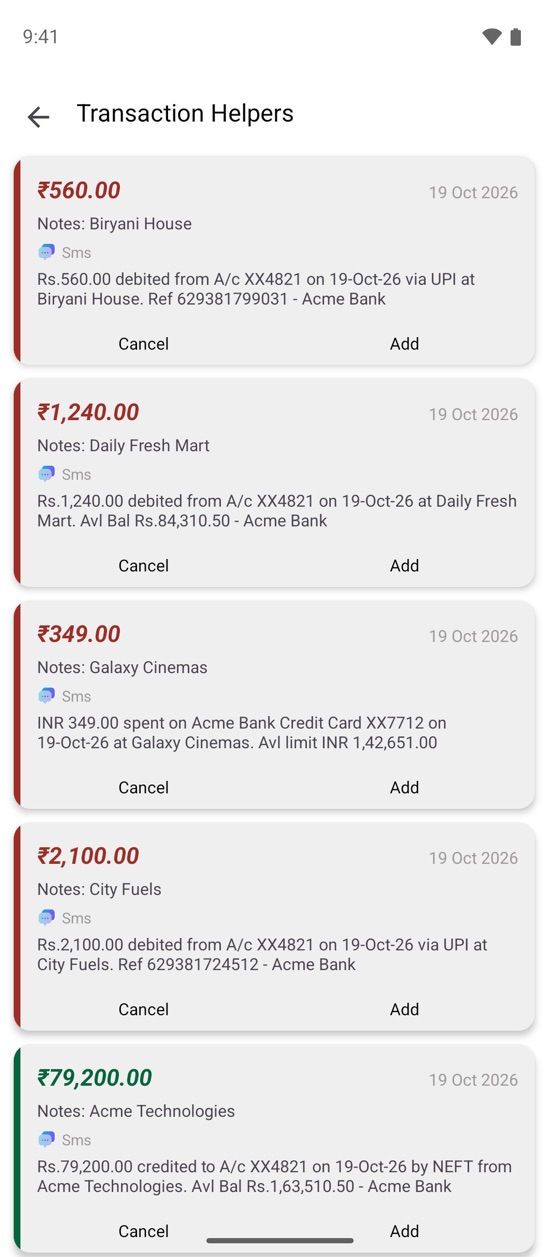
The main difference is how entries get in. Money Manager's listing describes typing entries on the phone or editing them on a PC. Expanager reads the alerts your bank already sends and prepares the entries for you: a UPI payment, a card swipe or a salary credit arrives as a ready-made entry with the amount, merchant and category, and you tap Add. For most people that's the difference between a tracker that's up to date and one that's a week behind. (How it works.)
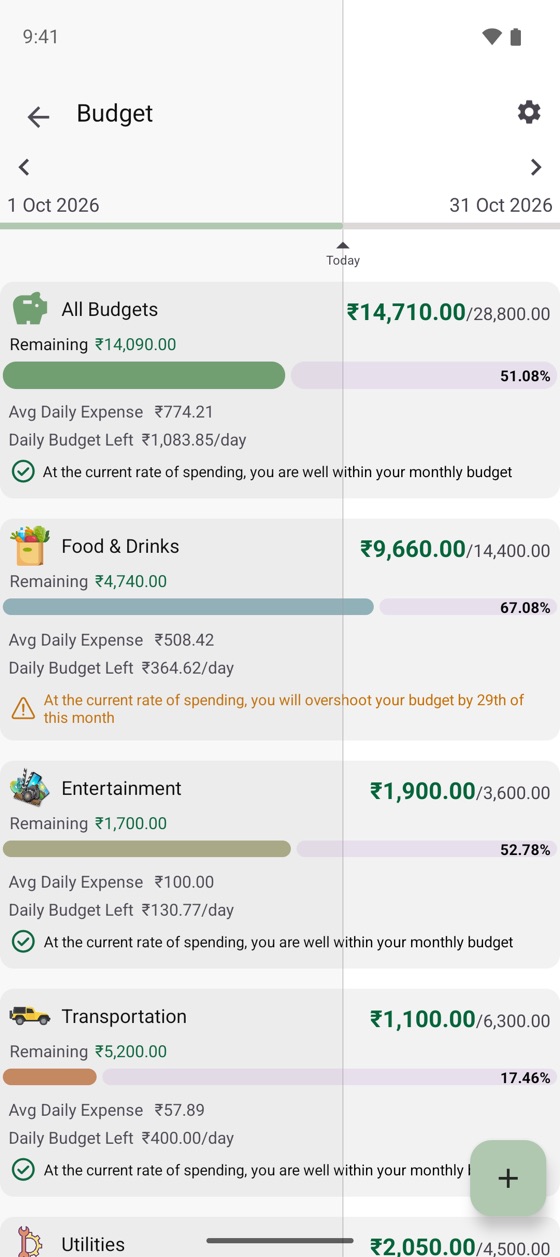
The second difference is ads: Expanager has none, in the free version too. The third is budgets that look ahead. Rather than a bar that fills up, each budget shows what you can spend per day for the rest of the month and warns you on the date you'll overshoot at the current pace.
Moving from Money Manager to Expanager
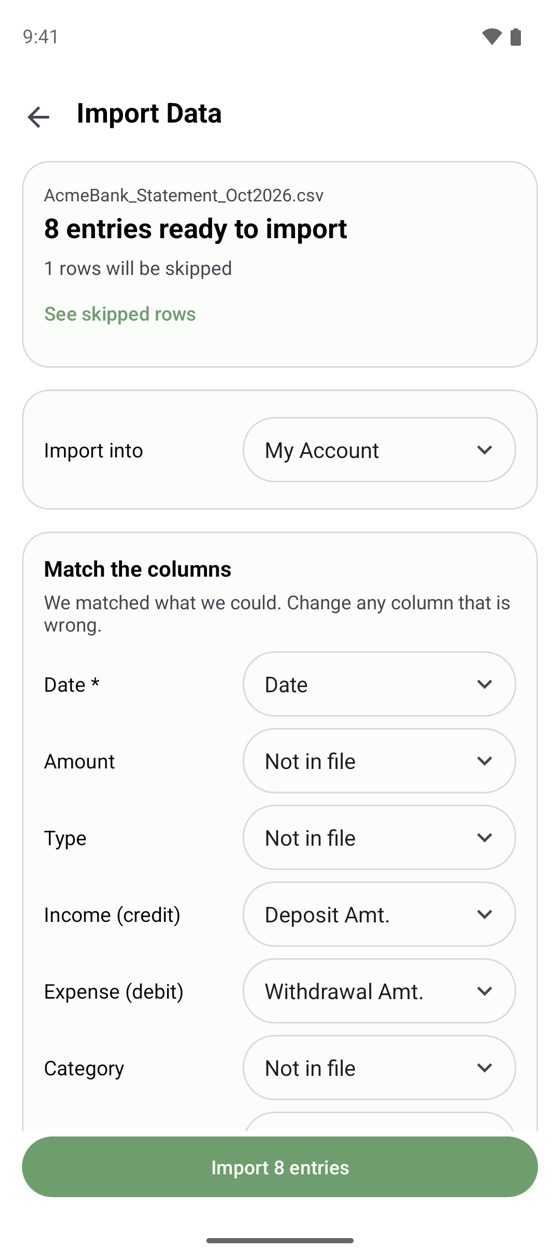
Money Manager backs up to Excel files, and Expanager imports Excel and CSV for free. Export from Money Manager, then in Expanager go to ⋮ → Settings → Backup and Restore → Import Data, pick the file, match the Date, Amount and Category columns, and import. Duplicates are skipped and missing categories are created. The Help centre has the details and tips for bank files.
Fine print
Try the one that fills itself in.
Free to download. No ads, no sign-up, no data leaving your phone.
